
Customer Translation Portal for Enterprise Translation Management
Request quotes, launch translation projects, manage files, track progress, approve work, and access completed deliverables in one secure online workspace. The Stepes Customer Translation Portal gives enterprise teams a faster, clearer way to manage multilingual content with Stepes.
Already working with Stepes? Sign in to access active projects, quotes, files, and completed translations.
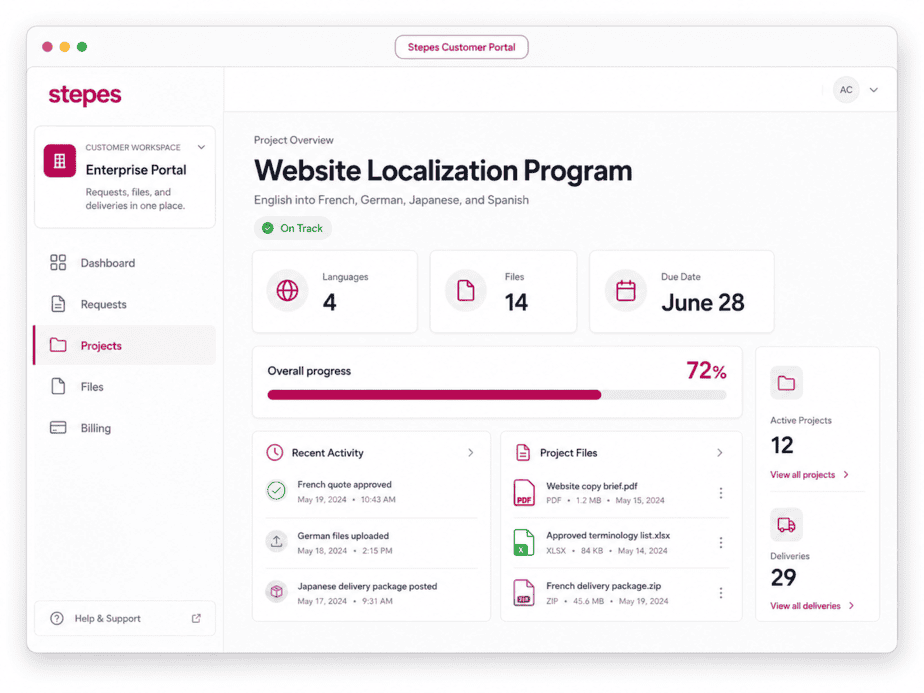
Keep requests, quotes, projects, and files connected from start to finish
From quote intake and approvals to active work, file delivery, and billing history, the portal gives enterprise teams a shared workspace for managing multilingual content with Stepes.
Submit translation, localization, and multilingual service requests through a structured online workflow.
Track active projects, language progress, due dates, and delivery status from one dashboard.
Upload source files, provide reference materials, and download completed translations in one place.
What You Can Do in the Stepes Customer Portal
The portal gives customers a practical way to coordinate translation work with Stepes across departments, content types, and markets.
Submit Translation Requests
Start new translation projects through a structured request workflow for enterprise teams.
Request and Approve Quotes
Review pricing, turnaround, and scope in one place so approved work can move forward faster.
Track Active Projects
Follow languages, milestones, delivery timing, and project status from one customer dashboard.
Manage Files and Deliverables
Keep source files, reference materials, translated assets, and final deliveries connected to each project.
Collaborate With Stepes Teams
Share instructions, answer clarification questions, and keep communication tied to the right project.
View Project and Billing History
Access completed projects, quote records, invoices, statements, and account activity from one workspace.
Submit Your Request
Step 1Upload files, select languages and services, and add project instructions through a structured intake flow.
Review Your Quote
Step 2Receive a clear online quote with pricing, turnaround, and project scope for review and approval.
Approve and Launch
Step 3Approve the project online so Stepes can move translation and review work into production without extra back-and-forth.
Track Project Progress
Step 4Follow status, milestones, files, and delivery timing from one organized customer dashboard.
Download Deliverables
Step 5Access completed translations, delivery packages, and project records as soon as work is finished.
Capture languages, files, deadlines, and services more consistently from the start.
Give stakeholders clearer visibility into active work, milestones, and deliveries.
Keep quotes, files, project activity, and completed deliverables tied together.
Built for Enterprise Teams That Translate at Scale
The Stepes Customer Translation Portal is designed for organizations that manage recurring multilingual content across teams, markets, and business functions. It gives enterprise stakeholders a more consistent way to request work, track progress, manage files, and retrieve completed deliverables across the content they manage every day.
One customer workspace for recurring multilingual programs
Whether teams are managing website updates, legal reviews, product releases, operational documents, or regulated content, the portal helps standardize how translation work is requested, tracked, and delivered across stakeholders.
Designed for teams that need clearer visibility across languages, files, and approvals
Standardize translation requests across departments, regions, vendors, and internal stakeholders.
Coordinate multilingual campaigns, website updates, launches, presentations, and customer communications.
Manage contracts, policies, business records, and sensitive compliance content with clearer project oversight.
Keep software strings, documentation, release content, and multilingual product updates aligned across teams.
Support clinical, medical, regulatory, labeling, quality, and patient-facing content workflows with clearer coordination.
Secure Customer Login
Authorized users can sign in to access translation activity, project files, and account records for their organization.
Organized Project Records
Requests, quotes, files, approvals, messages, and deliverables stay connected to each project in one workspace.
Customer Team Collaboration
Enterprise users can coordinate translation needs across departments while keeping communication tied to the right project.
Compliance-Aware Translation Workflows
Stepes supports translation requirements for business, legal, financial, technical, life sciences, and regulated content.
Connected to the Stepes AI Translation Platform
The Customer Translation Portal is part of the broader Stepes language technology ecosystem, connecting customer-facing project management with Stepes translation automation, professional linguist workflows, quality assurance, terminology management, and enterprise reporting.
What is the Stepes Customer Translation Portal?
The Stepes Customer Translation Portal is an online workspace where customers can request quotes, submit translation projects, manage files, track progress, communicate with Stepes teams, and access completed translations.
Can I request translation quotes through the portal?
Yes. Customers can submit project details, upload files, select languages and services, and receive translation quotes for review and approval online.
Can I track project status online?
Yes. The portal gives customers visibility into active translation projects, including project status, due dates, language progress, files, and deliverables.
Can multiple people from my company use the portal?
Yes. Enterprise customers can coordinate translation work across departments and stakeholders while keeping requests, approvals, files, and deliveries organized in one place.
Is the portal connected to Stepes translation services and technology?
Yes. The portal connects customer-facing project workflows with Stepes translation services, AI-enabled language technology, project management, quality assurance, and enterprise language operations.
Ready to Manage Translation Projects More Efficiently?
Use the Stepes Customer Translation Portal to request quotes, launch projects, track progress, manage files, and access completed translations from one organized customer workspace.